LoopX 个人工作区使用指南
在 LoopX 工作区里,你可以交代任务、查看 Agent 的进展、处理需要你决定的事项, 再检查交付结果。Goal 是你想要的结果,Todo 是为实现它而推进的具体工作。 管家汇总多个 Goal;进入一个 Goal 后,再看它的任务、对话和成果。
第一次使用,先按第 1 节完成一个小任务。第 3–4 节说明日常查看与跟进,第 6 节 按需接入飞书,第 8 节解释操作确认与结果核对。演示视频放在文末,不必看完视频再开始。 想从代码修复入手,也可以先做查 bug 练习。
🚀 1. 快速启动与访问
先按安装指南准备 LoopX、Python 3.11+ 和 Node.js 22.22.3+ (推荐 24 LTS)。普通使用不需要克隆源码或启动前端开发服务器。 在你要使用的项目目录打开终端,执行:
若 doctor 报告缺少依赖,先修复它指出的问题。若缺的是 Agent 登录或运行环境,
按下文「Agent 运行环境未就绪」处理;看到页面不等于 Agent 已可执行。
安装版会在同一个进程中启动打包后的工作区、状态投影和 Agent Chat,不需要另开
终端运行 loopx serve-status。命令默认自动打开浏览器;无界面启动可使用
loopx dashboard --no-open,并访问命令实际打印的 URL。默认地址为
http://127.0.0.1:8767/chat/。
普通 Codex / ACP 交互任务默认不设总时长截止;有持续进展的工作可以继续。
启动连接和无活动检测仍有期限,停止操作仍可中断。需要限时可显式传入
--hard-timeout-seconds 1800;--hard-timeout-seconds 0 取消该截止。
已有 macOS 服务保留原设置,使用 LOOPX_CHAT_HARD_TIMEOUT_SECONDS=0
经既有安装/启动管理器更新;有已接收任务时先等其结束,不强杀服务。
已接收的排队消息默认保留到执行或停止,显式 TTL 仍会到期。
这不改变 Goal、租约、权限、实验预算或有界 managed-host segment 的期限;
持续执行仍消耗宿主模型与工具额度。旧超时记录保留,恢复时先核对已产生的效果,
继续尚未完成的部分,避免重复外发、委派或其他操作。
English: Interactive Codex/ACP turns have no default wall-clock cutoff. Startup,
idle detection and Stop remain active. Set --hard-timeout-seconds 1800 for an
explicit deadline, or 0 to disable it. Existing managed macOS installations
preserve their setting; update through their existing service owner using
LOOPX_CHAT_HARD_TIMEOUT_SECONDS=0 and wait for accepted work to settle before
activation. Accepted queued input no longer expires implicitly; explicit TTLs
still apply. Goal/lease/permission boundaries, experiment budgets and bounded
managed-host segments remain in force. Continued execution still consumes host
allowance. Retain old timeout records and reconcile effects before continuing
unfinished work.
可选:从终端检查页面和状态是否可读
下面使用默认地址;若启动命令打印了其他端口,替换为实际地址。两项均读取本地服务, 不创建 Goal,也不启动 Agent:💡 两种入口可共存:
loopx dashboard(浏览器 / PWA)与 Tauri 原生桌面壳 都会复用已经在运行且版本匹配的 LoopX Chat 服务。先开 dashboard 再开桌面壳, 或先开桌面壳再执行loopx dashboard,两种顺序都可以;当桌面壳已经启动时, 也可以直接访问http://127.0.0.1:8767/chat/使用浏览器 / PWA,无需再启动一套 服务。
第一次使用:完成一个小任务
先用你愿意让 Agent 读取的项目,体验一次「提出要求 → 确认 → 执行 → 核对结果」。 已有同一目标的 Goal 时直接打开它,不重复创建。
-
点击 创建 Goal(或侧栏
+),可以用下面这组内容填写: -
目标: 梳理这个项目的启动与测试方式。
- 完成标准: 给出启动命令、测试命令及对应文件依据;没有找到明确说明时如实说明。
-
执行边界: 只读取项目文件,不启动项目、不运行测试、不修改文件、不调用外部服务;回答后停止。
-
选择正确的工作目录,将执行权限设为「只读」,点击检查配置。 预览应写明目标、完成标准、实际目录和权限;先检查这些内容。检查配置仍未创建 Goal。
- 确认预览后点击创建 Goal 并开始首轮。这一步会创建 Goal 和首个 Todo,并让 选定 Agent 开始首轮推进。随后进入该 Goal 的对话查看实际回答;排队与正在执行 是不同状态,失败时先看原错误,不重复创建同一个 Goal。
- 按回答给出的文件依据核对命令。这个任务没有运行测试,回答也就不能声称“测试通过”。 要让 Agent 继续验证或修改代码,再在原 Goal 中说明新增范围与权限,沿既有流程处理。
跑通的标志是:找到了正确的项目、Agent 返回了有依据的说明、你能核对它的结果。 不是只看到一张 Goal 卡片或“已完成”标签。没有可用执行器、目录不可用或来源只读时, 先处理页面报告的具体问题,不把本机新建 Goal 当作远端工作的替代。
准备与费用: 本地页面与 Agent 执行是两件事。创建首轮或发送执行任务会使用所选 宿主的模型额度和工具资源;周期任务还会增加唤醒与检查开销。先用这个有终点的小任务, 确认既有额度、运行环境和停止条件,再考虑定时任务。升级沿用原安装渠道;运行时登录、 飞书连接等按各自设置维护,不需要为了开始而全部配置。
English: Start with one bounded task in a project you choose. Create a Goal with an objective, completion criteria, workspace and Read only permission; review the configuration before Create Goal and start first run. For example, ask for the project's documented start/test commands and their file references, without running tests or changing files. Inspect the returned references rather than treating a created card as a completed result. Reuse an existing Goal for the same work. Agent execution uses the selected host's allowance; recurring work adds wakeup/checking costs. Neither opening the page nor creating a Goal proves that its host is active or that its result passes acceptance.
1.1 Agent 运行环境未就绪 / When no Agent runtime is ready
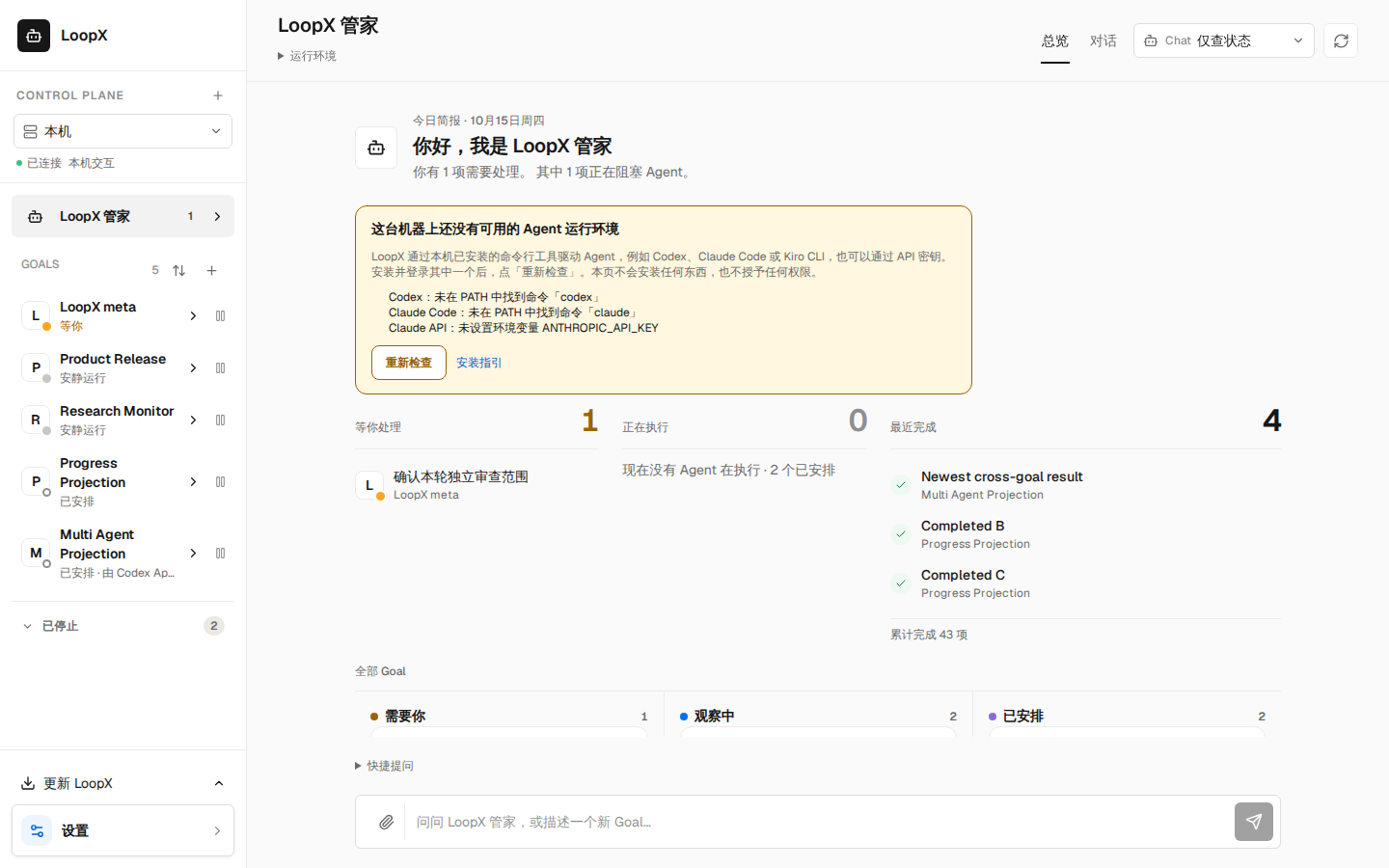
LoopX 通过本机已安装的命令行工具驱动 Agent(Codex、Claude Code、Kiro CLI),或通过 API 密钥。 如果这台机器上一个都没有就绪,管家总览会在顶部说明原因,逐项列出缺什么(未在 PATH 中找到的命令、 未设置的环境变量),并提供「重新检查」和「安装指引」。安装并登录后点「重新检查」,页面重新读取 服务的运行环境目录并回读结果;本页不会安装任何东西,也不授予任何权限。打开 Goal 对话时,如果选中的 运行环境在本机不可用,输入框上方会给出同样的说明和重新检查。 执行环境缺失不影响管家和 Goal 中的「仅查状态」:它保存原问题与状态回答,不启动 Agent。 没有该选项的项目对话会明确拒绝未就绪的执行路线,并保留未发送的草稿。
LoopX drives Agents through a command-line tool installed on this machine (Codex, Claude Code, Kiro CLI) or through an API key. When none is ready, the manager overview says so at the top, lists what each runtime needs (a command not found on PATH, an environment variable not set), and offers Check again and a Setup guide link. After installing and signing in, Check again re-reads the service's runtime catalog and reads the result back; the page installs nothing and grants nothing. In a Goal conversation, the same notice and re-check appear above the composer when the selected runtime is unavailable here. Missing execution runtimes do not disable Status only in manager and Goal conversations: it stores the original question and status answer without starting an Agent. A project conversation without that option refuses an unavailable execution route and retains the unsent draft.
🧭 2. 控制台核心架构
graph TD
    A["LoopX 控制台"] --> B["LoopX 管家模式 (全局总览)"]
    A --> C["Goal 频道模式 (单一目标深度)"]

    B --> B1["你不在的时候 (离线统计)"]
    B --> B2["4 泳道任务流 (需要你 / 执行中 / 观察中 / 已安排)"]
    B --> B3["全局快捷问询与创建 Goal"]

    C --> C1["Tasks 4 列看板"]
    C --> C2["Chat 完整对话流"]
    C --> C3["Files 产出交付物"]
    C --> C4["Context 诊断抽屉 (仓绑定 / Lark 状态)"]
🏠 3.「LoopX 管家」全局总览模式
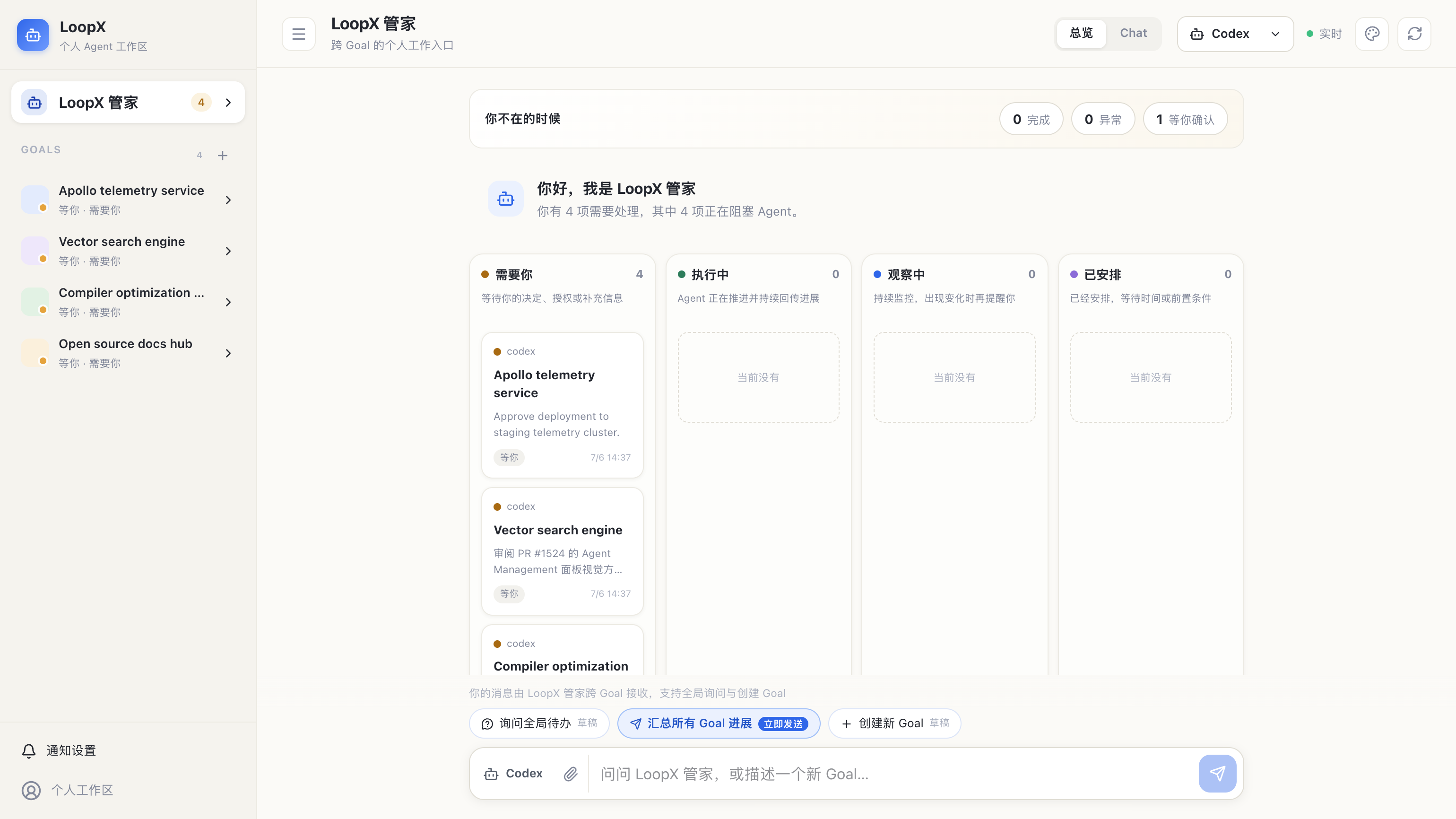
点击左侧侧边栏顶部的 「LoopX 管家」,进入全局总览模式。
首次打开 / First open
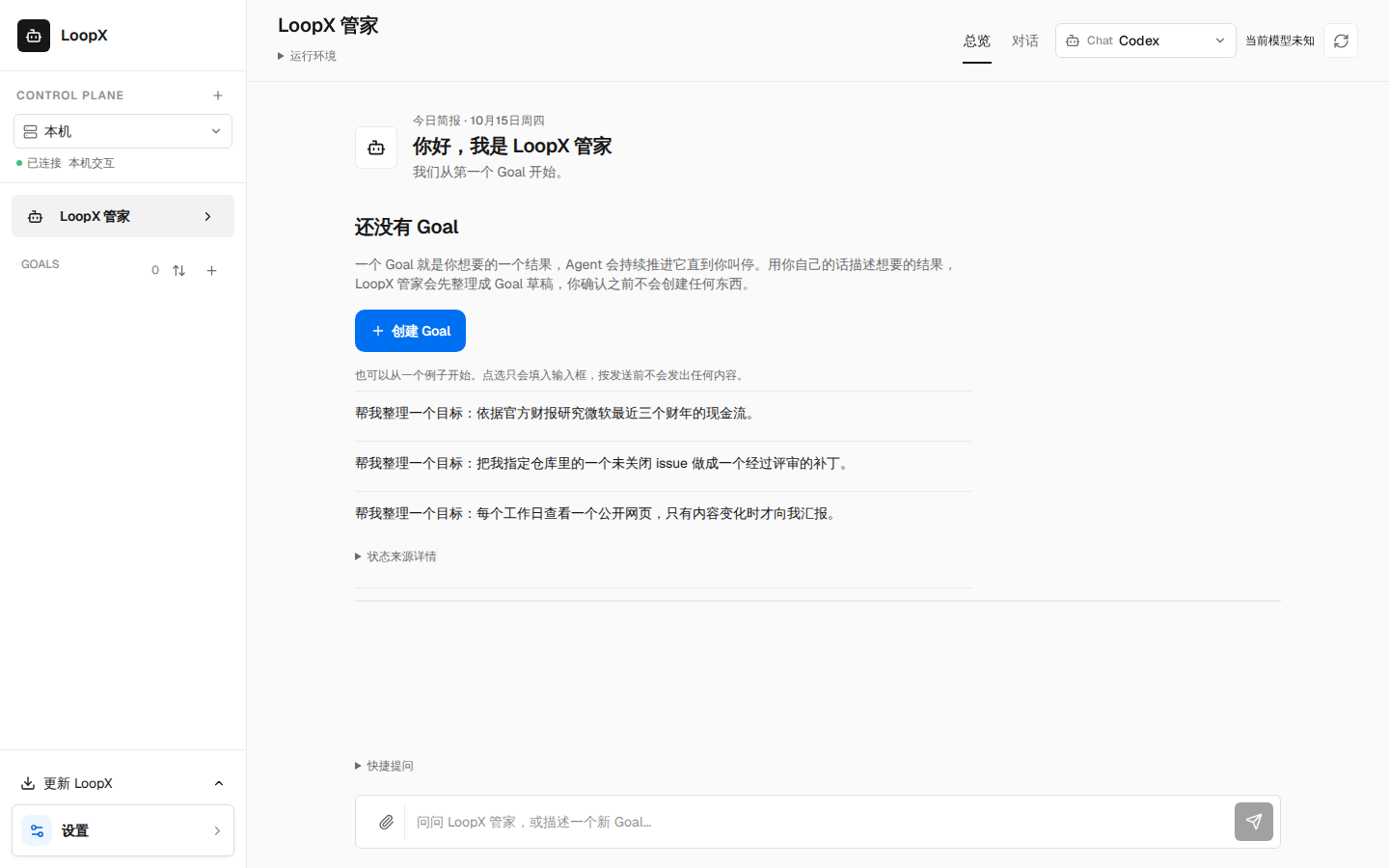
还没有任何 Goal 时,总览不显示空泳道或健康告警,而是一个「还没有 Goal」状态:一句话说明
Goal 是什么、一个 创建 Goal 按钮(打开与侧边栏 + 相同的创建表单),以及三条示例
请求。点选示例只会填入输入框,按发送前不会发出任何内容。状态来源自身的检查行(例如
本机尚未建立注册表)折叠在「状态来源详情」里。只有状态来源真的不健康(例如注册表损坏)
时才显示健康告警,并以可读句子描述问题,原始检查行同样折叠在「诊断信息」里。本机还没有可用的
Agent(例如 Codex 未安装或未登录)时,「创建 Goal」的检查会直接告诉你是哪个 Agent、缺什么(命令
或环境变量)以及下一步怎么做,不会写入任何内容,表单内容也会保留。
可用的 Agent 也可能因工具能力、信任范围或远程工作区映射而拒绝创建。此时表单显示实际原因,
不会把配置拒绝当成安装或登录问题。修复后可直接再次检查;未修改的内容及操作身份保持,
修改内容则形成新请求。检查仍不创建 Goal,只有原来的确认动作才能创建。
When no Goal exists yet, the overview shows a first-Goal state instead of empty lanes or a
health banner: what a Goal is, a Create a Goal button (the same form as the sidebar +),
and three example requests that only fill the composer. The status source's own check
lines (such as "no registry yet on this machine") stay collapsed under "Status source
details". A health banner appears only when the source is actually unhealthy, in plain
sentences, with the raw check lines collapsed under "Diagnostics". When this machine has no usable Agent yet (Codex not installed or not signed in), the Goal creation review names that Agent, what is missing (the command or the environment variable) and the next step; nothing is written and the form keeps what you typed.
An available Agent may still refuse creation because of tools, trust scope or a remote workspace
mapping. The form shows the actual reason instead of an installation or sign-in instruction.
Repair that configuration and review again: unchanged contents retain their request identity;
editing them starts a new request. Review creates no Goal; the original confirmation is still required.
核心功能区
- 「你不在的时候」离线概览:
- 聚合展示你离开期间所有 Agent 的运行结果:
已完成数量、异常/失败数量以及当前等你确认的阻塞项。 - 4 泳道全局任务流(Swimlanes):
- 🛑 需要你(Needs You):高亮展示当前所有正等待你审批、确认或提供输入的问题(如权限审批、环境授权);
- ⚡ 执行中(In Progress):展示当前正在被自主推进的 Agent Todo 与 Goal;
- 👀 观察中(Observing):展示正在运行的持续监控与定时巡检任务;
- 📅 已安排(Scheduled):展示挂起的周期性计划。
- 全局快捷指令(Quick Prompts):
[询问全局待办 (草稿)]:一键将「有哪些 Goal 正在等我?优先处理什么?」填入输入框;[汇总所有 Goal 进展 (立即发送)]:带有蓝色高亮标识,点击后立即发送并在右下角弹出托盘展示全局总结;[创建新 Goal (草稿)]:快速填入目标模板草稿。
Unrecognized execution observations / 执行方式未知
A session with an open Turn but a missing or unknown execution mode is shown as unknown. It contributes neither managed execution nor a host claim, and its timestamp cannot refresh another worker's activity. The workspace brief, sidebar and Goal vitals use the same distinction. Explicit managed activity or an independent host observation still establishes execution.
会话有未结束的回合,但执行方式缺失或未知时,界面显示“执行方式未知”, 不计入正在执行或宿主已领取,也不会用它的时间刷新其他工作的活跃状态。 首页摘要、侧栏和 Goal 状态保持一致;明确的托管执行或独立宿主观测仍正常显示。
问答中的等待与失败
前端与飞书的 Chat 回答保留项目内文件的相对位置,例如 ./notes/report.md,便于核对产物;机器目录、项目外路径及另外声明为私有的目录仍隐藏。项目根目录本身显示为 [project]。本机 Markdown 链接保留可读标题,不发送无法在飞书使用的本地链接;状态、提议和权限门禁仍使用完整路径脱敏。这仅改变展现,不授予读取或写入权限。
Frontend and Lark Chat answers retain project-relative filenames such as
./notes/report.md, while hiding machine roots, other local paths and separately
protected directories. The project root itself remains [project]. Local
Markdown links keep their readable labels instead of unusable local destinations;
status, proposals and gates still redact entire local paths. This changes answer
presentation, not read or write authority.
管家与 Goal 的前端对话共用运行视图,适用于查询、编码、投研等各种任务:回答下方显示当前正在做的一步,例如「正在读取 notes.md」。使用 Codex 执行器时,展开「执行过程」可逐步查看思考、读取、搜索、运行的命令、调用的工具和修改的文件;同一步的开始与结束合并为一行,失败的步骤标出退出码,点击一行可查看完整命令、改动文件列表或思考内容。思考内容仅在模型向宿主公开时显示(有的模型只给出思考用时);不显示命令输出、工具参数与结果或文件改动内容,项目内路径显示为相对路径,其余本机路径和疑似凭据会被隐藏。「完成」只表示该步结束,不代表检查通过。这些步骤只保存在本机、仅所有者可读的会话回放记录中;回合结束超过 24 小时后,下次启动 LoopX Chat 时清理。其他执行器继续显示「最近活动」中的最近六条记录。尚未收到活动时保留等待提示,不根据等待时长推测执行进度。
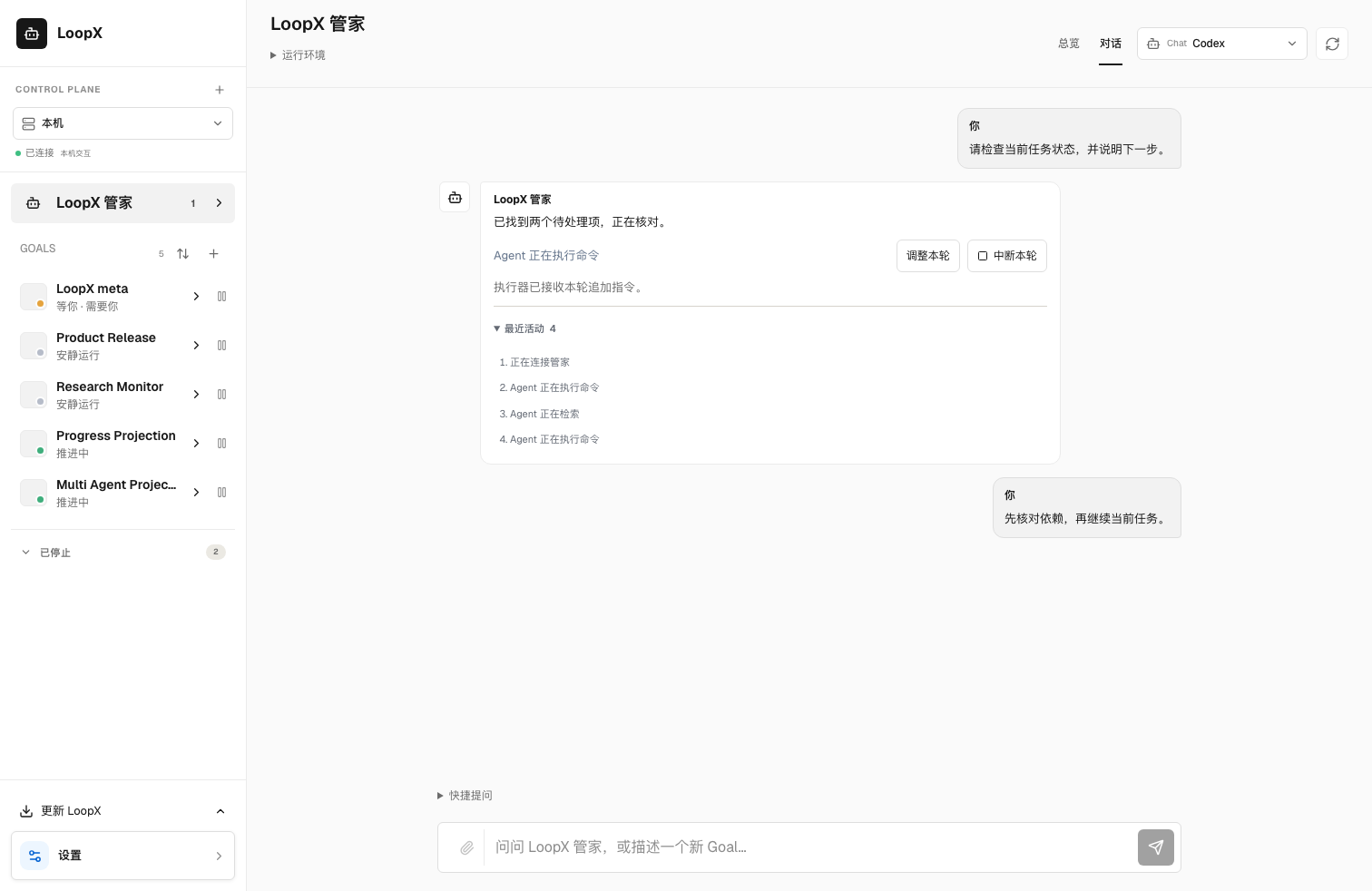
点击回答中的「中断本轮」可以停止该回合。成功后保留已经显示的回答,继续发送消息会沿用当前会话;这不会停止整个 Goal。中断失败时错误留在原回答中,执行状态继续显示;若回合先完成,界面保留完成结果。仅连接到外部宿主、未开放中断的会话会返回宿主限制。
The steward and Goal conversations share the same frontend activity view across task types. The reply shows the step in progress, such as "Reading notes.md". With the Codex executor, expand Work steps to follow each thought, read, search, command, tool call and file edit; a step's start and end share one row, failures show their exit code, and clicking a row reveals the full command, the changed files or the thinking text. Thinking text appears only when the model exposes it to the host (some models report only how long they thought). Command output, tool arguments and results, and file diffs are never shown; project paths read as relative paths, other local paths and credential-like values are hidden. A completed step means it ended, not that a check passed. Steps live only in the owner-only local session replay; the next LoopX Chat start after a Turn is more than 24 hours old clears them. Other executors keep Recent activity with the latest six observations; missing activity stays an honest waiting state. Interrupt turn targets that reply, preserves already visible text, and keeps the conversation available for continuation. A rejected interruption leaves the live reply visible; completion wins a race with interruption. This control does not stop the Goal. Attached hosts that do not expose interruption report that limitation.
运行中可点击「调整本轮」,向原任务追加指令。当前支持原生 Codex 执行器;只有收到匹配的执行器回执后才显示已接收,这不代表调整后的任务已经完成。不支持的执行器、过期回合或无法确认的回执会保留草稿,不自动变成新任务。送达状态未知时,重试沿用同一请求编号,防止重复投递;执行器明确拒绝且确认未送达时,条件恢复后可用原文安全地重新发起。回合结束后,未发送的草稿仍可复制到输入框。「调整本轮」和普通会话输入框中的追加指令,在发送前必须将重试信息保存到当前标签页的浏览器存储并读回;刷新后恢复原请求身份,不自动发送。存储不可用时会提示尚未发送,草稿仅保留在当前页面;恢复存储后再重试。
Use Adjust turn to add instructions to the running task. Native Codex executors currently support this control. A matching executor receipt confirms acceptance, not completion. Unsupported executors, expired turns and unconfirmed receipts retain the draft without starting another task. An unresolved delivery keeps the request identity on retry to prevent duplicates; a confirmed pre-delivery rejection allows the unchanged draft to start a new request after recovery. After the turn ends, copy an unsent draft to the composer. Both Adjust turn and an ordinary conversation's in-turn composer save and read back retry information in tab-local browser storage before dispatch. Reload restores the original identity without sending. If storage is unavailable, the adjustment is not sent and its draft stays in the current page; restore storage before retrying.
For API callers, POST /api/chat/sessions/{session_id}/turns/{turn_id}/steer
accepts message (1–12000 characters) and a stable client_ingress_id.
The successful receipt includes both identities, the ingress id and
status: delivered. Reusing the ingress id with changed text or a different
turn is rejected. The original turn stream continues; this endpoint never
queues a new turn. A pre-delivery rejection reports delivery_state: not_delivered;
an uncertain outcome reports delivery_state: unresolved. Replaying the same
ingress id preserves its recorded outcome; a confirmed non-delivery needs a new
id for a fresh attempt. Existing LoopX-mode and Lark ingress keep their contracts.
Codex 上游声明仍会重试时,会话显示「Codex 正在重试」并继续等待最终结果。若上游明确终止,LoopX 保存失败回执,不把已经出现的部分文字当成完整回答。明确的策略拦截、用量限制、频率限制、上下文超限和身份验证失败会保留各自类别;未知错误仍显示通用失败,不从报错正文猜测原因。
策略拦截是本轮已结束,不是仍在安全检查中。LoopX 不会自动重放该请求;重启或重复提交同一个请求编号也会返回原失败回执。界面提示只说明上游给出的类别,不解释其未提供的具体触发原因,也不公开上游原始错误详情。
3.1 停止暂时不活跃的 Goal
当 Goal 较多时,主列表只展示仍处于 active 状态的 Goal。点击 Goal 右侧的暂停按钮后,LoopX 会先展示 Typed Action 预览;只有你明确确认,Goal 才会进入 「已停止」 折叠区。
- 停止会暂停该 Goal 的自动 Agent Turn,并从「需要你」等活跃聚合中移除;
- 退出 active attention 后,该 Goal 的有效 quota 会投影为 0,调度器据此停止 Codex App heartbeat 等宿主自动化;原 quota 配置仍被保留;
- Goal 的 Todo、历史、证据和配置全部保留,不会被标记成「已完成」,也不会删除;
- 展开「已停止」,点击恢复按钮并确认,即可重新获得调度资格;恢复后仍需通过 quota、Gate 和 Todo 约束。
stop 与手动设置 quota.compute=0 共用同一条自动停机通道,但恢复权限不同:前者只能由显式 Goal resume 恢复,后者由显式提高 compute quota 恢复。这样 quota 操作不会意外复活一个被 owner 停止的 Goal。
该操作不会强杀正在执行的工具调用;下一次 quota should-run 会返回宿主停机指令,由 Codex App 等宿主暂停或删除当前 heartbeat,阻止后续自动 Turn。
CLI 提供同一套可预览、可验证的生命周期操作:
# 零写入预览
loopx goal-lifecycle --goal-id <goal-id> --operation stop

# 确认执行,再读取 quota 验证自动推进已暂停
loopx goal-lifecycle --goal-id <goal-id> --operation stop --actor-kind owner --execute
loopx quota status --goal-id <goal-id>

# 恢复;不会绕过其他运行门禁
loopx goal-lifecycle --goal-id <goal-id> --operation resume --actor-kind owner --execute
--execute 必须显式声明 --actor-kind owner 或 controller;不带 actor 的
预览仍保持只读。写入的 activation receipt 会保留该 actor kind。
执行时,LoopX 会写入权威 source registry、同步全局 registry,并验证两端 readback;任一端未验证成功时不会宣称操作完成。
切换到 SSH 状态来源后,只有来源与本机 OpenSSH 配置中的精确 Host alias 绑定时,
侧边栏才显示停止/恢复按钮。操作通过 SSH 在目标主机执行同一个
goal-lifecycle typed contract,并验证远端投影;不会回退修改本机同名 Goal。
手工 URL 以及创建、删除、Todo、会话等其他远端操作继续保持只读。
创建 Goal 时选择工作目录 / Choose a working directory when creating a Goal
打开侧边栏的「创建 Goal」,填写目标和完成标准后,在「工作目录」中选择:
- Dashboard 工作区:启动 Dashboard 时配置的目录(见下文),即使还没有 Goal 使用它;
- 已有 Goal 的工作目录:沿用该 Goal 绑定的目录;
- 默认工作区:由当前会话与连接配置解析。
检查配置时,预览的「执行工作区」会写明目录名称、来源(Dashboard 工作区或与已有 Goal 共用),以及是否为默认解析结果;确认后的 Goal 一定在预览所示目录中创建,执行权限仍由表单中的 权限选择与后端校验决定。对话草稿也会显示同样的执行工作区,并可通过「修改」打开同一个表单改选。 如果检查配置失败,目标文本与目录选择会保留供重试;失效或不可用的目录不会自动换成另一目录。 预览只显示目录名称,不显示本机完整路径;同名目录(包括已有 Goal 的目录)会逐级附带上级目录名,直到可以区分。
要管理多个项目,可在启动时一次配置多个目录,之后每次创建 Goal 时分别选择:
不在列表中的目录无法在页面上直接输入;请用 --scan-path 重新启动 Dashboard,或先通过
项目连接流程接入。选择目录不会增加执行权限。
Open Create Goal in the sidebar, enter the objective and completion criteria, and choose a Working directory:
- a Dashboard workspace — a directory the Dashboard was started with (below), even before any Goal uses it;
- an existing Goal's directory — reuse the directory that Goal is bound to;
- the default workspace — resolved from the current conversation and connection routing.
The review's Workspace field names the directory, where it comes from (a Dashboard workspace or shared with an existing Goal), and whether the default chose it. Confirming creates the Goal in exactly that directory, under the selected execution permission and the existing backend checks. Conversational drafts show the same field, and Edit opens the form to choose another directory. A failed preview retains the text and selection for retry; unavailable selections never silently redirect to another directory. The review shows directory names, not local paths; two directories with the same name, including existing Goals' directories, gain parent directory names until they read apart.
To work on several projects, start the Dashboard once with each directory and pick one per Goal:
Directories that are not listed cannot be typed into the page; restart the Dashboard with
--scan-path, or connect the project first through the
project connection flow. Choosing a directory does not expand
execution permissions.
🎯 4. Goal 深度工作区
在侧边栏点击具体的 Goal(例如 Apollo Spacecraft Telemetry Pipeline),进入该 Goal 的独立工作台。
4.1 Tasks 列表与看板视图
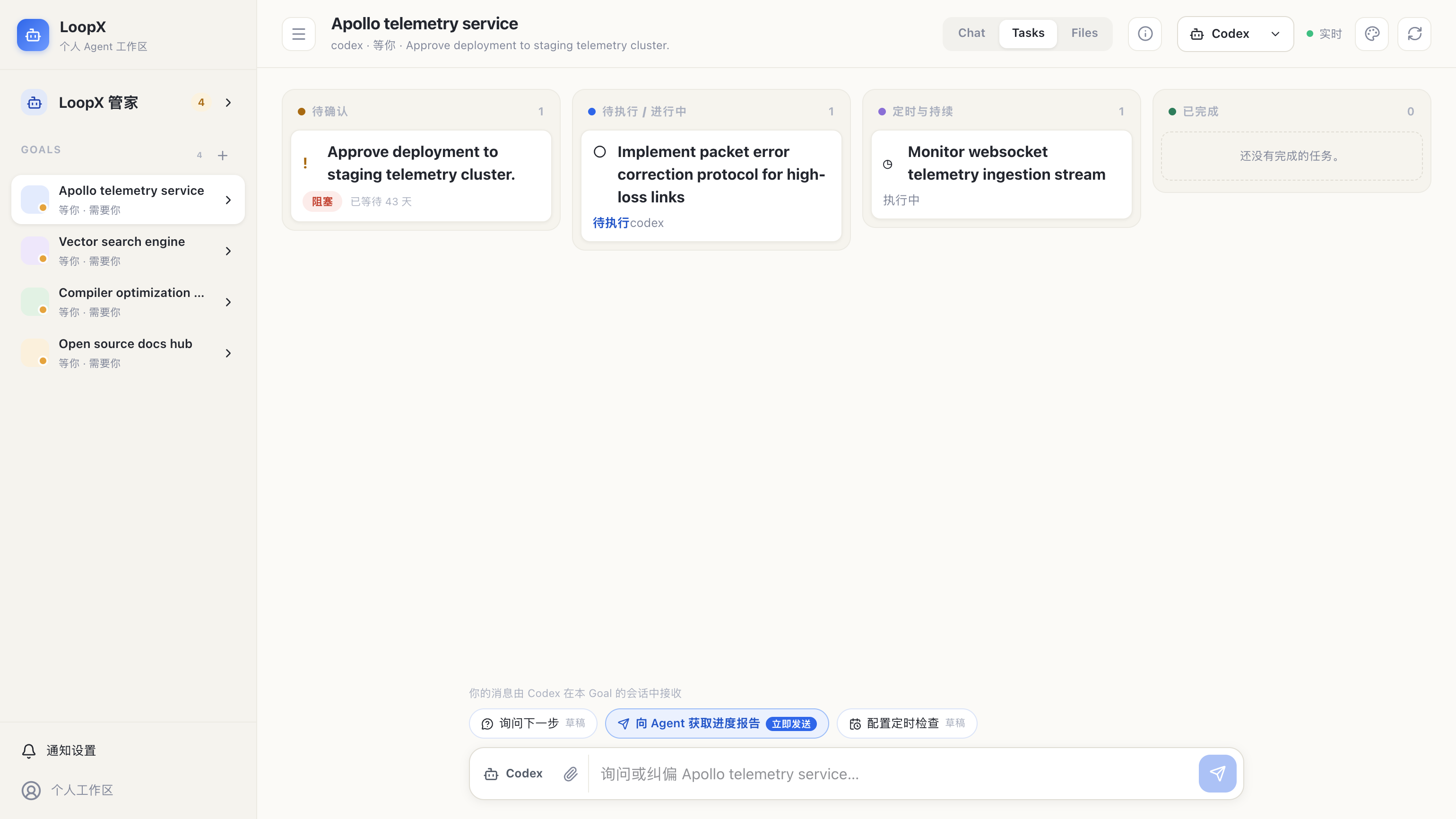
- 默认显示四列看板;可切换到分组列表,列表中空分组隐藏、已完成分组默认折叠。
- 看板与列表共享已完成历史(包含归档,排除持续监控任务),按工作 Agent 筛选。列表的已完成组默认折叠;展开并滚动可按需加载,每页 40 条,使用五分钟快照保持翻页稳定。两种视图均只渲染可见区域附近的记录,切换视图保留历史和总数。快照过期可重试,读取失败保留当前记录。只读远端来源不调用本机历史接口。本机历史详情保留 Todo 读取层返回的文本、路径和证据,不额外截断或替换路径;Markdown 读取层原有的 500 字符规范化上限仍适用。
- 在已完成列的「搜索完成历史」中输入标题片段或 Todo ID,按 Enter 或「搜索」。查询覆盖当前 Goal 与 Agent 筛选下的完整保留历史(含归档),不是仅搜索已加载的页面;总数是匹配数量。「清除」恢复未筛选的历史。搜索与重试只读,不完成任务或启动执行;远端只读来源不使用本机搜索。查询为不区分大小写的字面子串,最多 256 个字符,不搜索证据正文。
Completed history supports a title fragment or Todo ID search from the Tasks board or expanded completed list. Submit with Enter or Search to search all retained history, including archives, within the selected Goal and Agent lane. The count shows matches; Clear restores unfiltered history. Search and retry are read-only. Remote read-only sources never use local history search. Matching is a case-insensitive literal substring of the title or ID, limited to 256 characters; evidence bodies are not searched. The Overview rail retains its separate “Search listed tasks” scope.
- 初次连接先显示加载状态,不把示例任务当作实时数据。执行会话连接失败时显示重连提示并退避轮询,隐藏页面暂停新的会话查询。
-
Files 的“前往会话”进入 Goal 会话;“导出摘要”导出安全摘要 Markdown,不下载原始文件。
-
分组含义:
- 待确认(Attention Required):需用户决策或授权的卡片(黄色/红色标红,显示等待时间);
- 待执行 / 进行中(In Progress):按 P0 / P1 优先级排列的 Agent 待办事项;
- 定时与持续(Scheduled & Continuous):绑定的周期性检查与监控;
-
已完成(Completed):已标记完成的工作任务;摘要总数与当前可查询明细的范围分别展示。
-
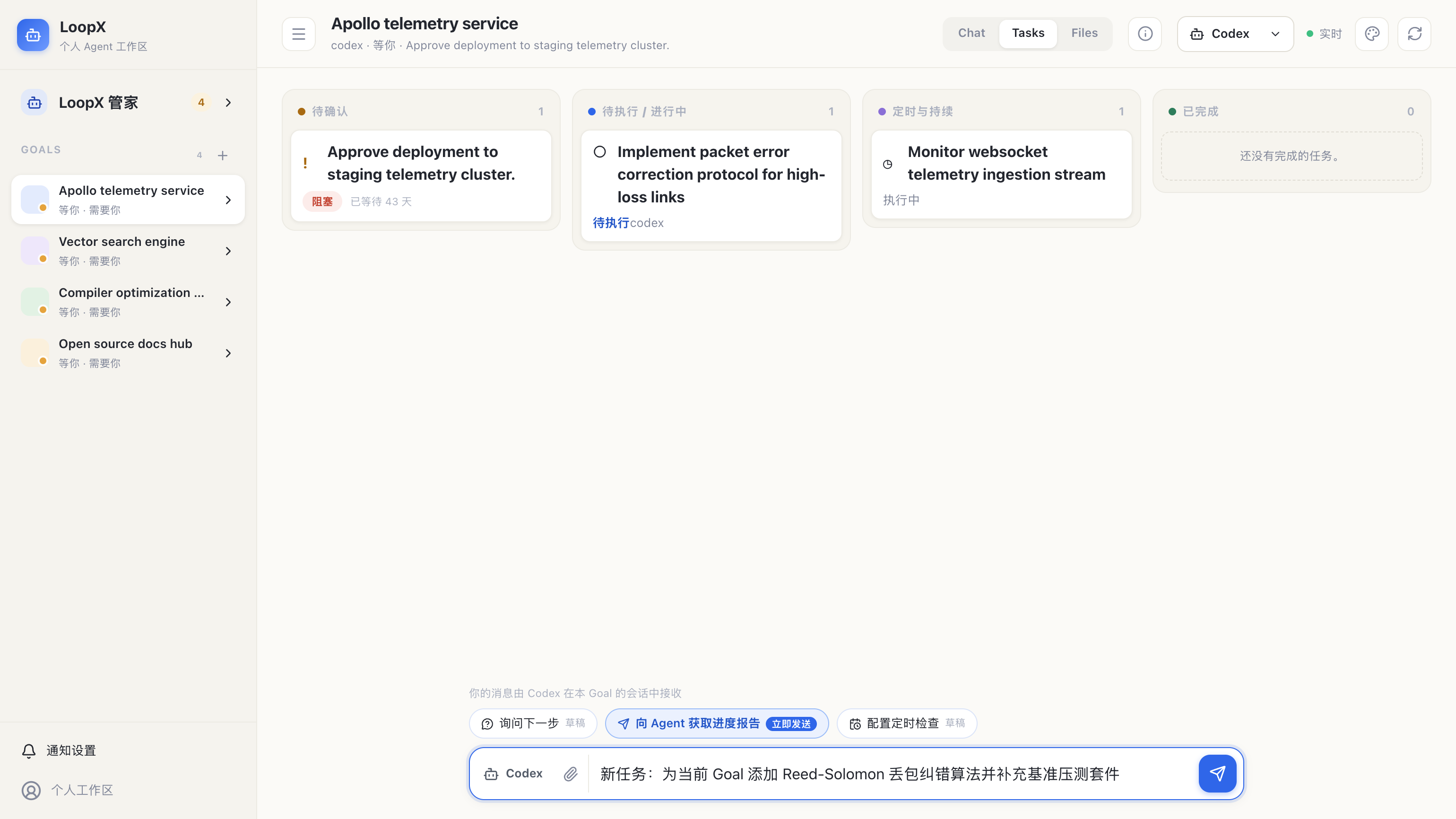
💬 对话建议一键「转为 Task」:
- 看板顶部横幅会展示 Agent 最新的进度报告与下一步建议;
- 点击
[转为 Task]按钮,系统会自动清洗掉无关客套文案,将核心行动项智能转换为结构化草稿回填到底部输入框,供你确认后创建!
4.1.1 状态感知的快捷建议 / State-aware suggestions
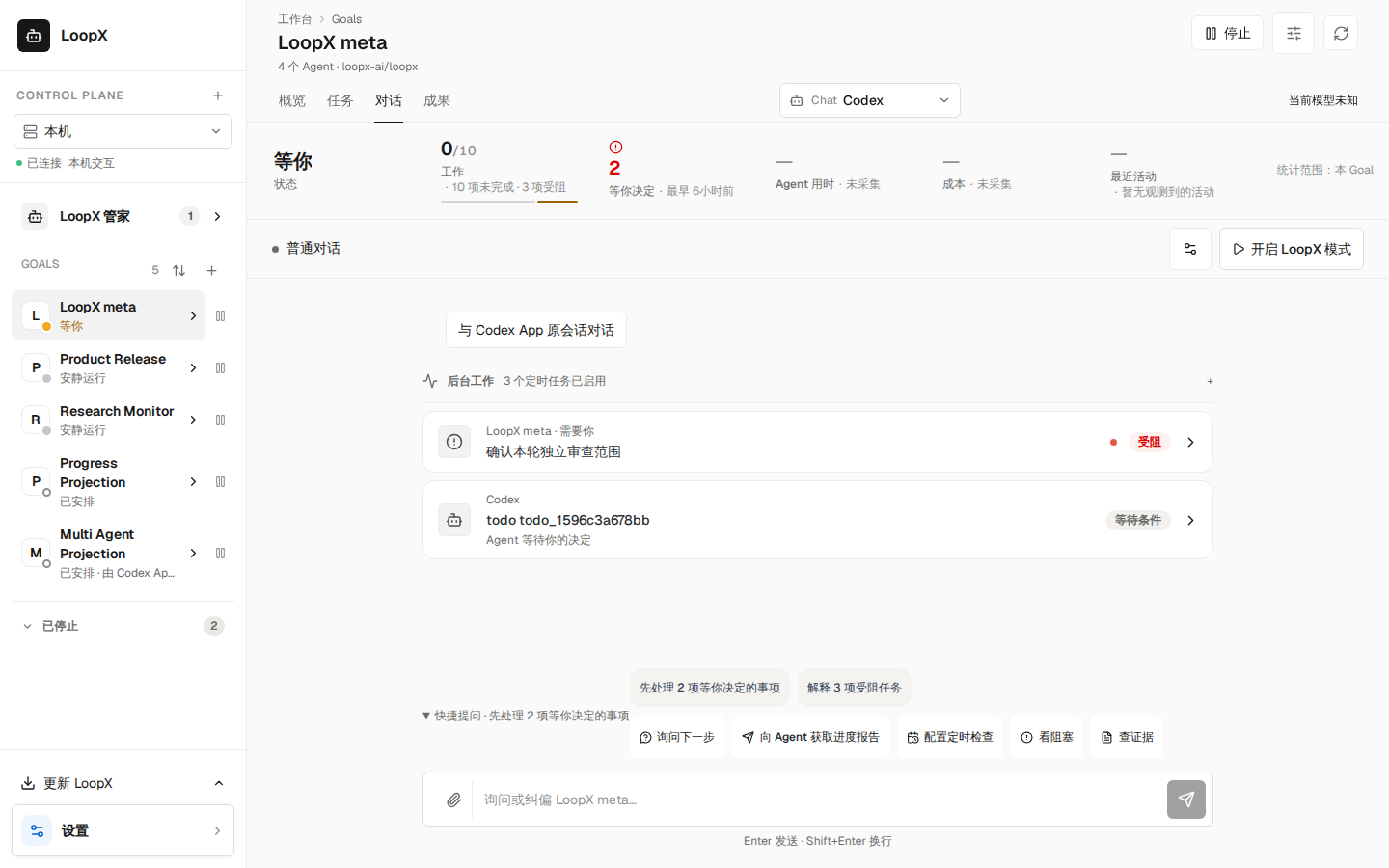
Goal 对话页的「快捷提问」折叠行,除了固定的几条问题外,会根据这个 Goal 的当前投影给出至多三条 建议,每条只引用投影里的真实事实:有事项等你决定时是「先处理 N 项等你决定的事项」,点击直接打开 概览页的需要你栏;有受阻任务时是「解释 N 项受阻任务」,点击把这些任务的标题带进问题立即发送; 验收条件未通过时是「为什么「…」未通过」;观察到没有运行中的工作且仍有未完成任务时是「继续推进」; 任务全部完成时是「查看成果」。「等你决定」只计需要你介入的事项,可选提醒会列出但不计入; 「查看成果」只在工作列表完整且已知没有未完成任务时出现,只列出一部分的投影不会被当作全部完成。 已停止的 Goal 不给建议;执行状态未知时不会假装空闲。折叠时摘要行会带出第一条建议,便于一眼看到。
The "Suggestions" disclosure on a Goal's Chat view adds up to three suggestions derived from the Goal's current projection, each citing a real fact: decisions waiting on you (opens the overview's needs-you rail), blocked tasks (sends a question naming those tasks), a failing acceptance criterion, no observed running work with open tasks, or all tasks done. "Decisions" counts only items that wait on you; an optional reminder is listed but not counted. "All done" appears only when the work list is complete and the owner's open count is known to be zero; a partial listing is never read as finished. A stopped Goal gets no suggestion and unknown execution is never read as idle. The collapsed summary line shows the first suggestion.
4.1.2 自你上次查看 / Since you looked
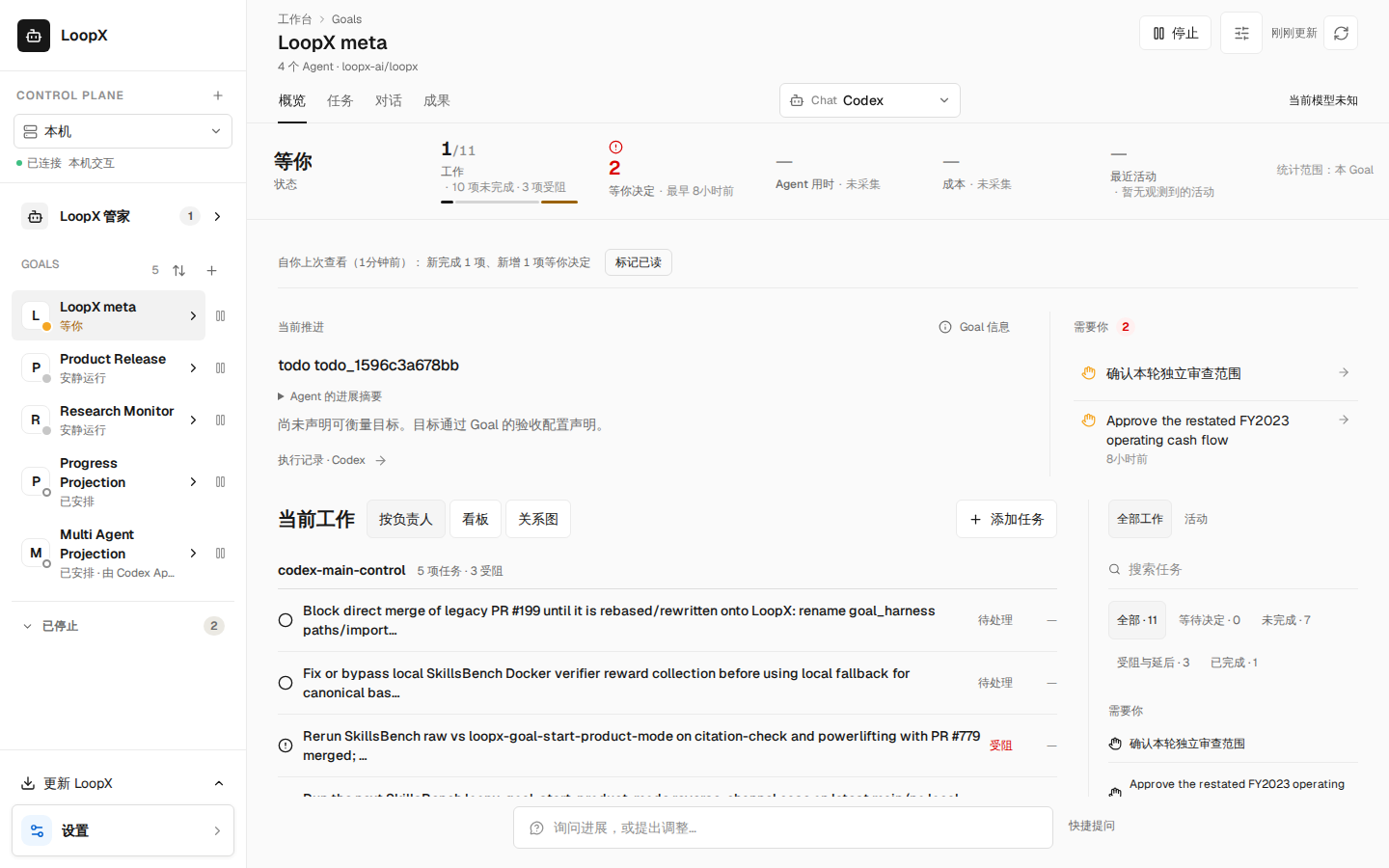
回到一个 Goal 的概览时,如果自你上次查看以来有实质变化,概览顶部会出现一行安静的摘要: 「自你上次查看(3 小时前):新完成 2 项、新增 1 项等你决定、新受阻 1 项、新成果 1 项」,以及 「标记已读」。它来自这个浏览器本地保存的上次查看标记(只有计数和编号,不含标题、内容或费用), 不写回服务,也不是通知。「等你决定」只计需要你介入的事项,可选提醒会列出但不计入。没有实质变化时 不显示;点「标记已读」以当前画面为基线,离开这个 Goal 则以这次进入时看到的那一眼为基线,期间到达但 没有呈现的变化下次回来仍会算入;已点过的「标记已读」不会被离开撤回。标记只保留每类最近 200 个编号, 超出后只按数量增长判断新增,没有总数时就不再报告,不会把没保留的旧项当成新项。浏览器不允许本地存储时只是失去这份记忆, Goal 照常可读。费用变化暂不纳入:用量投影还不能可靠地界定两次查看之间的区间。
When you return to a Goal's overview after a material change, one quiet line at the top says what changed since your last look ("Since you looked (3 hours ago): 2 newly done, 1 new decision for you, 1 newly blocked, 1 result returned") with Mark seen. It comes from a marker this browser keeps locally (counts and ids only, never titles, content or cost), writes nothing to the service and is not a notification. "Decisions for you" counts only items that wait on you; an optional reminder is listed but not counted. Nothing shows when nothing material changed. Mark seen makes what is on screen the new baseline; leaving the Goal keeps the look you arrived to, so a change that landed during the visit without being shown is still reported next time, and leaving never undoes a Mark seen. The marker keeps the latest 200 ids of each kind; beyond that only growth of the count reports something new (nothing at all when there is no total), never an older item the marker did not retain. A browser that denies local storage only loses this memory; the Goal stays readable. Spend is left out until the usage projection can qualify the exact interval between two looks.
4.2 Goal 概览与交付依据 / Goal overview
手机默认折叠目标与验收条件,可随时展开;顶部「全部工作」打开侧栏,Escape 关闭并返回入口。 窄屏侧栏选择任务后关闭,沿用同一详情与 URL 选择;未知远端链接明确提示当前快照没有该任务。
On phones, direction and criteria start folded. The top-bar All work control opens the rail; Escape closes it and returns focus. Selecting work opens the existing task details. Unknown remote links report unavailable snapshot details without querying local task owners.
Goal 顶部直接提供 概览、任务、对话、成果,分别用于判断进展、推进工作、 与 Agent 沟通和查看产出。选择一个 Goal 后仍默认进入四列任务看板; 看板与列表保持原有任务范围。切换页面后,任务筛选、已加载历史和各页滚动位置保留。 右上角设置直接打开既有能力配置;返回后保留工作区。切换 Goal 或数据源则重新建立页面上下文。
点击一次 概览,即可查看方向、需要处理的决定、当前工作和成果。
「当前工作」默认按实际负责人分组,未分配的任务单列;延后与完成记录保留在「全部工作」。
可在同一区域切换既有看板与关系图。选择任务打开原有详情,关闭详情后保留选中项;
URL 的 todo 参数支持刷新与返回恢复检查上下文。来源中已找不到的任务仅能读取完整要求,
不能沿用旧快照的操作权限。
「添加任务」就在当前工作区域:输入一次,检查后确认一次,创建结果通过刷新读回。 检查或应用失败时保留草稿,可从原有动作流程重新检查和确认;选择视图不会执行任务。 右侧「全部工作」可按状态筛选并搜索已载入的任务;完成记录沿用既有分页与虚拟化历史。 「活动」显示时间线中已结束的执行、已返回成果和已记录决定,覆盖范围取决于来源。
The Overview composes Direction, Needs you, Now and Results. Now groups work by its recorded owner,
with an explicit Unassigned group. Board and Map are lenses of the same work. Selecting a task opens
its existing inspector; closing it retains selection, and todo in the URL restores inspection after
reload or browser back. A task absent from the current source can read its exact request without
retaining stale action authority. Add task uses one input and the existing preview/confirmation path;
a failed preview or apply retains the draft. All work filters/searches listed tasks and reuses paginated,
virtualized completed history. Activity shows ended runs, returned results and recorded decisions from
the available timeline; it makes no complete-history claim.
工作指标保持明确的覆盖范围: 工作指标只有在来源提供完成数、且未完成列表覆盖已知时显示“完成 / 总数”。 缺失或有界数据会保留“总数未知”,显示当前所列未完成项而不绘制完成比例;实际报告的零仍是零。 任务卡片与时间线区分已安排、执行中、等待、需检查、已中断和已完成;排队不表示已开始执行。 决定与执行记录直接打开原有详情;「查看任务」「查看成果」前往对应页面。 低频仓库、连接和运行信息保留在「Goal 信息」中,不再充当查看进展的必经路径。
交付与依据:概览直接展示当前交付链、责任、关联关系和验收观察, 不需要额外打开复盘弹窗。可按标题、负责人或引用搜索,选择节点沿关系追溯, 并打开当前工作区中的任务、决定或执行记录。交付链默认列表,桌面可切换关系图。
工作地图:在当前工作的「关系图」中查看 Goal 的工作形状:全部未归档任务、决定和持续监控, 以及已记录的依赖、延续与替代关系。默认「当前工作」显示进行中和受阻的事项、它们的直接前序 (单项超过 2 个已完成前序时折叠为计数),以及待决定事项会解锁的工作;已完成或延后的其余工作 隐藏并计数。「全部」包含早期已完成工作。互不相连的工作链分框排列,需要决定的链在前; 没有关联的事项单独列出。选中事项会高亮全部前序与后续,检查器列出「之前 / 之后」并可打开任务详情。 连线只来自已记录关系,不代表可以执行;遗漏、来源裁剪或依赖成环时显示「部分工作未出现在此地图中」, 关联端点未找到时同样保留不完整提示,不能推断它已归档或属于其他 Goal。手机改为列表。
范围与刷新:交付链覆盖当前选中工作及有限前序;完整 Goal 关系请看工作地图。 缺失前序、来源裁剪与未展开决定可展开查看;任务完成或缺口列表为空都不代表通过验收。 概览与任务页共用一次交付快照读取;「刷新快照」可更新它,离开两页时取消未完成请求, 不增加普通状态读取的图计算。状态变化后自动重读快照,重读完成前暂停来源跳转和导出; 重读失败才提示快照已过期。 读取失败保留其他概览内容并显示重试提示,不将失败视为工作已完成。
导出:「导出交付快照」下载包含读取时间、完整当前链、工作地图、关系、证据引用和验收观察的 Markdown。搜索筛选不会裁剪导出;不包含原始日志、文件正文或对话正文。 成果与报告继续由成果页统一展示,不在概览建立第二份成果清单。
显式验收合同:若本地所有者已为使用 canonical authority 的 Goal 启用合同,
交付链下方可展开「Goal 验收合同」,查看条件、任务关联与独立的产物检查结果。
「任务关联已确认」不等于「产物检查通过」,后者也不自动批准或完成 Goal。
缺失、停用保持原界面;旧检查显示其原版本,刷新失败不会作为最新结果导出。
配置入口是本地所有者 CLI:先 loopx goal-acceptance inspect --goal-id example-goal,
再按配置与回滚指南(v0)
使用 configure --document --expected-provider-revision、verify 或 disable;
变更与执行检查需要 --execute。不新增网页配置入口,不自动提升 provider。
边界:原有交付链观察无需模型调用或新配置。远端只读来源可查看同步的概览和验收观察, 不回退查询本机同名 Goal 的交付链。所有阅读、筛选与导出均不改变任务、租约、预算或 审批;来源操作仍使用既有预览和权限检查。本次没有状态迁移,回滚沿用原安装流程。
English: Use the direct Overview / Tasks / Chat / Files navigation. Goal selection still opens Tasks. Switching views or returning from settings retains task filters, loaded history and scroll; a different Goal or source starts a new view session. Settings opens the existing capability editor directly.
Overview brings progress, pending decisions, execution and usage into one page. The Work vital shows done/total only with a reported completion count and known complete open-work coverage. Missing or bounded totals show the listed open work and an explicit unknown-total notice, without a completion ribbon; a reported zero remains zero. Task cards and the timeline distinguish scheduled, running, waiting, failed, interrupted and completed observations. Scheduled work is not presented as executing. Its delivery section reads the bounded current chain and acceptance observations on entry or explicit refresh, with search, map/list layouts, source navigation and Markdown export. Leaving Overview aborts pending reads. A changed workspace re-reads the snapshot automatically; source navigation and export pause until it returns, and only a failed re-read reports the snapshot as stale.
The Work map above the chain shows the whole Goal: every non-archived task, decision and monitor, with recorded requires/follow-up/replaces relations. Current work keeps in-progress and blocked items, their direct prerequisites (more than two finished ones collapse into a count on the card) and the work an open decision unblocks; other finished or deferred work is hidden and counted. Everything adds earlier finished work. Unconnected chains sit in separate frames, chains awaiting a decision first, and unlinked items sit in their own strip. Selecting an item highlights its full lineage and lists what comes before and after it, with Open details for tasks. A line is a recorded relation, not permission to run. Omitted items, a truncated source or a dependency loop show "Some work is not on this map". Missing linked items also keep that notice: absence alone does not prove archival or another Goal. Phones get a list instead of a canvas. Export retains the entire validated delivery snapshot regardless of filtering, excluding raw logs and conversation/file bodies. Outputs remain in Files. Missing observations never certify acceptance. Remote sources show their synchronized observations without querying the local delivery API. The baseline delivery-chain read requires no model call or configuration and adds no write authority or migration.
When a local owner explicitly enables an acceptance contract on an already
canonical Goal, expand Goal acceptance contract below the delivery chain.
It separates confirmed task associations from artifact checks and shows both
the current contract basis and recorded verification basis. Neither approves
or completes the Goal. Missing or disabled contracts preserve the baseline view.
Start with loopx goal-acceptance inspect --goal-id example-goal; the
owner guide (v0)
covers exact configure, verify and disable commands. Authoring stays in the
explicit local-owner CLI; it does not automatically promote a provider or add a
web configuration surface. Refresh the snapshot after a CLI operation.
CLI readback uses the same existing owners:
loopx --format json status --goal-id example-goal --include-task-graph
loopx --format json review-packet --goal-id example-goal
loopx --format json todo list --goal-id example-goal
The last command returns the typed relation fields the Work map draws.
The local Chat HTTP read is GET /api/chat/delivery-review?goal_id=example-goal.
Lark continues using its existing Goal Channel projection; this slice adds no
Lark card or notification and does not qualify cross-channel presentation parity.
💬 5. 悬浮会话托盘(ManagerConversationTray)
无论你在浏览总览还是在处理看板,只要点击带有 立即发送 标识的快捷指令,页面右下角都会弹出抽屉式的轻量对话托盘:
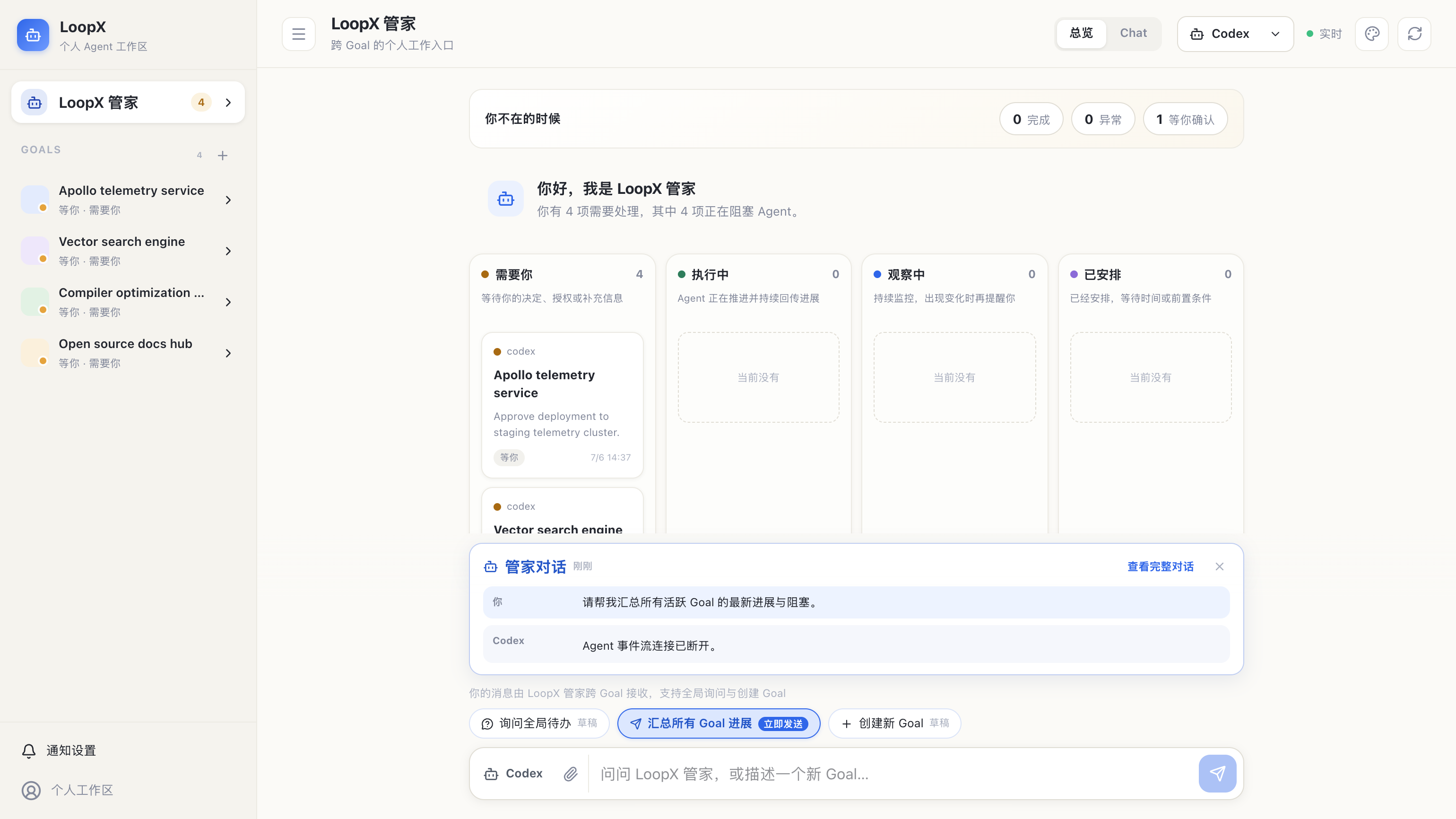
- 非侵入式体验:托盘浮出时不会打乱或覆盖主看板的浏览位置;
- 即时交互:阅读完毕后点击托盘右上角的
[×]即可随手收起。
🔍 6. Goal 诊断与 Lark / 飞书话题连接抽屉
进入 概览,点击 Goal 信息,可从右侧滑出元数据诊断抽屉:
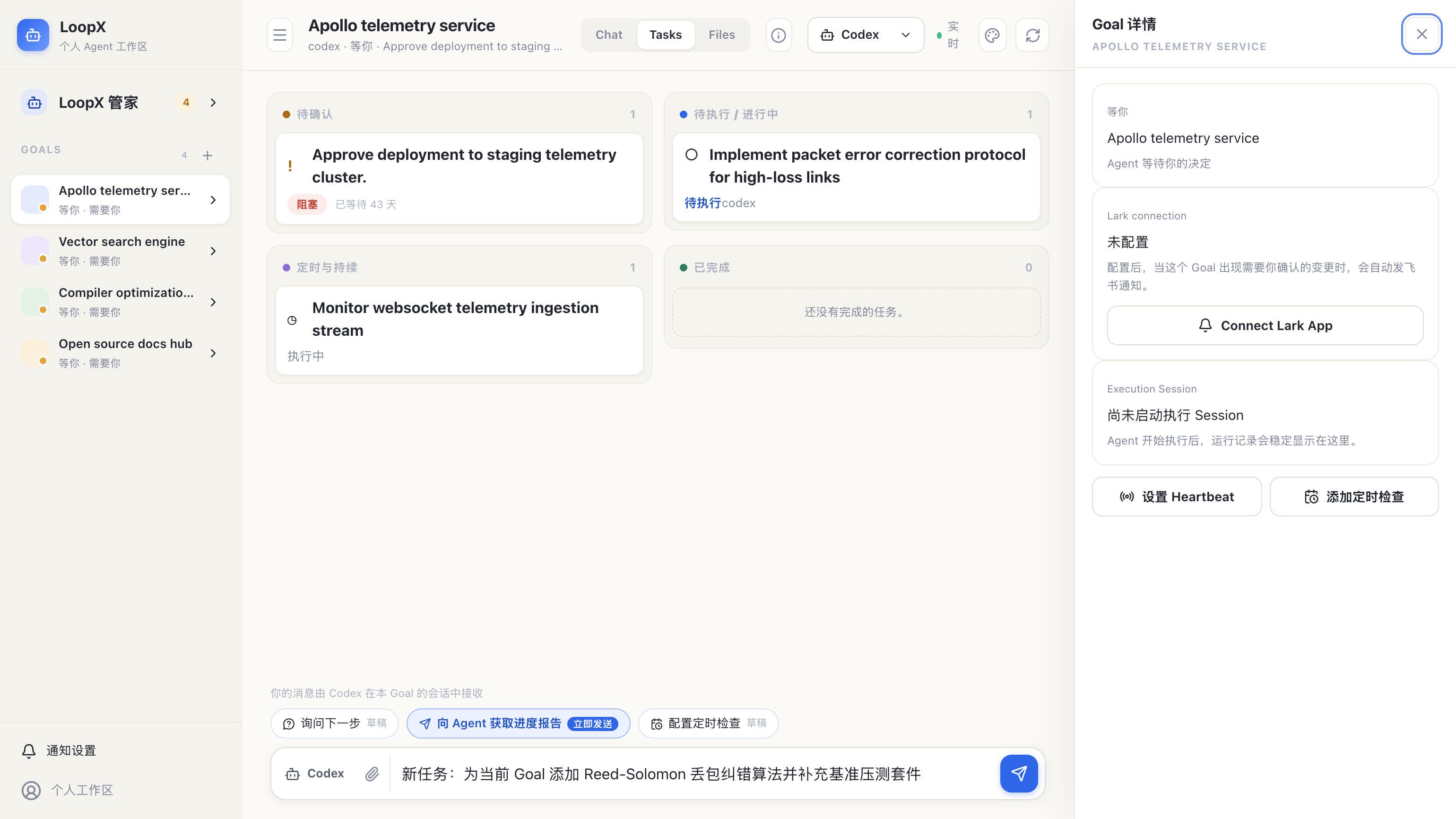
- 执行健康度:展示 Session ID、是否可继续以及当前 Agent 状态;
- 代码仓只读绑定:明确展示当前绑定的 GitHub / 本地仓库、生效分支及只读隔离属性;
- 自适应子代理执行:按 Goal 展示当前开关、可选的
task_domain限制与最多子代理数; - Lark / 飞书话题连接:
- 展示当前绑定的飞书群组与 Topic 话题;
- Capture scope:可选择只接收明确 @ / 回复 App 的消息,或接收该 Goal Topic 的全部消息;这只改变捕获范围,不扩大 Agent 权限;
- Agent ingress:为 Goal 当前已注册的目标 Agent 选择一种明确的收信方式:
- Steering (
live_steering):投递到该 Agent 当前精确的活跃 Turn;没有匹配的 活跃 Turn、Session 已过期或运行时不支持原生 steering 时安全拒绝; - Queuing (
session_queue):写入同一精确 Agent Session 的有界 FIFO,当前 Turn 完成后按顺序处理,并支持重启恢复; - Async inbox (
async_inbox):写入该 Agent 的本地私有收件箱,等待后续显式lark-inbox drain;投递本身不会创建内联 Session,也不会提前回复或 ACK;
- Steering (
- Reply mode:回复仍限定在来源 Topic 内,避免跨群或跨 Goal 投递。
6.1 按 Goal 体验自适应子代理执行
该控制面默认不对外暴露。先在 Goal 所在主机上显式启动带权威 opt-in 的本地 Dashboard;不带此参数启动时,配置 API、状态字段和界面卡片都会保持缺失:
然后要为一个 Goal 开启运行时能力:
- 进入该 Goal 的 概览,点击 Goal 信息;
- 在「自适应子代理执行」中选择最多子代理数。任务领域限制是可选项:全部不选表示
不按领域过滤;需要进一步收窄时,再从当前 Goal 开放 advancement Todo 已声明的
task_domain中多选。每个选项会显示当前匹配的开放 Todo 数量。控制台优先读取 完整 Todo index,压缩的 Goal 卡片 Todo 仅作兼容回退; - 点击开关。此时只生成零写入预览;检查领域限制与并发上限后,再点击「确认」;
- 界面只有在 source registry 写入、共享 registry 同步和读回校验都成功后,才把 开关显示为「开启」。
可在终端读取同一权威配置和运行时决策:
要撤销 Dashboard 配置面的 opt-in,停止当前 Dashboard 后不带
--enable-goal-subagent-configuration 重新启动。这个启动参数只暴露本机 loopback
上的 preview-locked 配置合同,不授予 Agent 新的 Goal、仓库、凭证、发布或生产权限。
关闭时再次点击开关、检查预览并确认;也可以使用同一配置入口:
如果当前没有开放 advancement Todo 声明 task_domain,界面会显示说明性空状态,
但不会阻止开启。此时只是不增加领域过滤,Todo 仍必须通过状态、依赖、quota、能力、
仓库、写入范围和冲突检查。选择了一个或多个领域后,未声明或不匹配领域的 Todo 会被
拒绝。控制台不会从 Todo 文本猜测领域,也不会提供与真实 Todo 无关的固定候选列表;
已保存但当前匹配数为 0 的领域仍会显示,方便审阅或移除既有边界。
这个开关只给运行时增加有界的临时子代理容量,不会强制并行,不会创建持久 Agent
层级,也不会绕过 Todo 归属、quota、能力、Gate 或写入范围。SSH 状态来源保持只读,
必须在 Goal 所在主机上修改。所选 allowed_domains 会进入 Goal 配置,不要填写凭证、
客户名或其他私密信息。完整执行语义见
Codex sub-agent orchestration。
在「通知设置 → Lark / 飞书 → Connections」中选择 Goal、Target Agent、群聊、 Capture scope 与 Agent ingress,保存后可在同一页读回当前模式、Session 绑定状态、 监听状态和最近事件结果。Steering 与 Queuing 要求该 Goal / Agent 已有工作 Session; Async inbox 不要求活跃 Turn,适合后台 Agent 稍后处理。发送一条新的 @ 消息验证所选 模式;若选择 Async inbox,可用以下命令读回待处理事件:
要停用该 Goal 的话题入站,在 Connections 中选择 Disconnect。断开只移除这个 Goal 的 Topic 路由,不删除 Goal、Agent Session、历史 Todo 或其他 Goal 的连接。
🎨 7. 双主题切换(温和 Paper ⇄ 硬朗 Brutal)
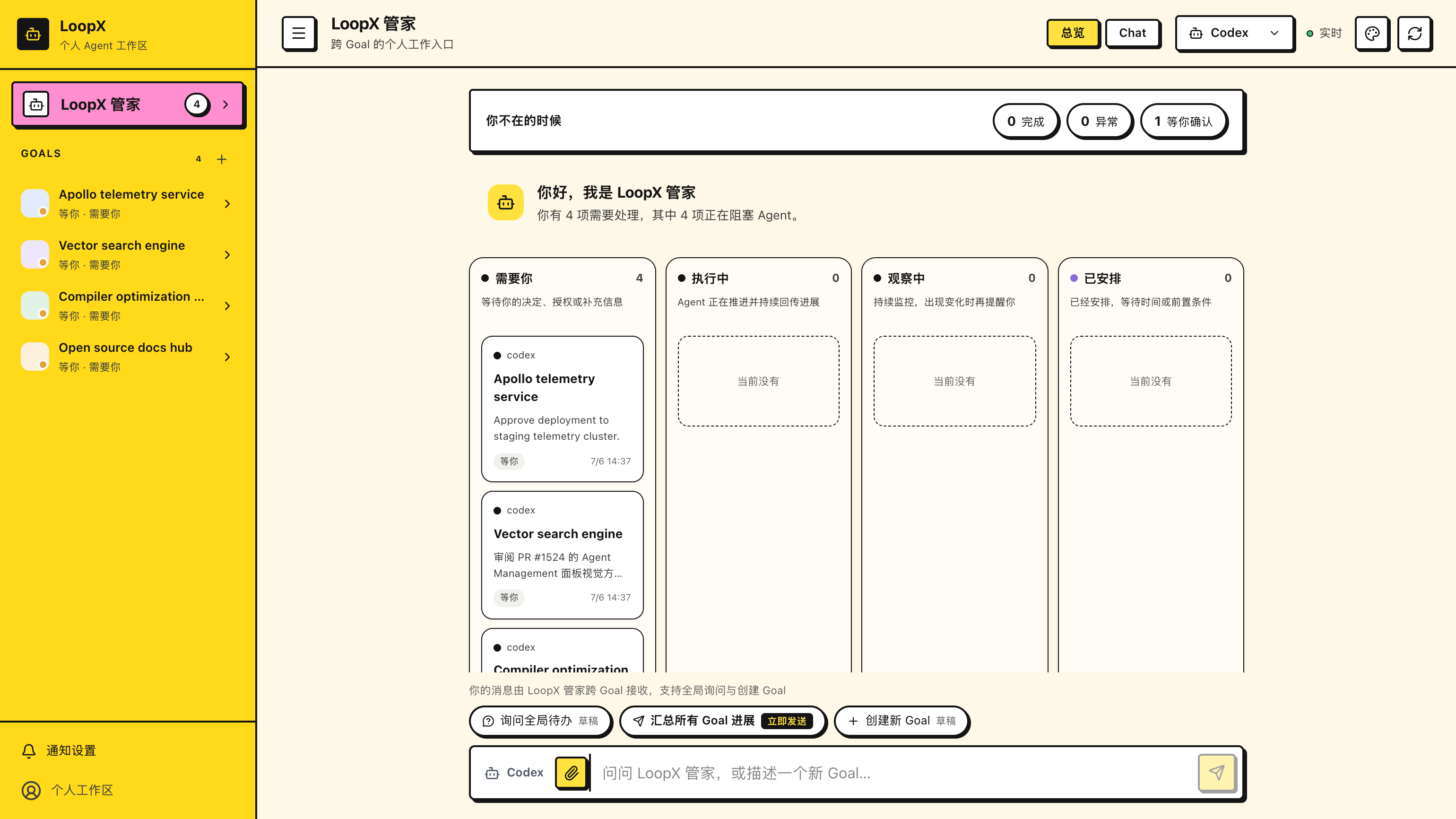
点击右上角的主题切换按钮,即可在两种主题间无缝流转:
- 默认温和纸质主题 (
Paper):适合日常长时间工作,低饱和度护眼; - 野兽派主题 (
Brutal):粗黑边框、硬阴影、高对比亮黄与极客风格。
7.1 桌面通知 / Desktop notifications
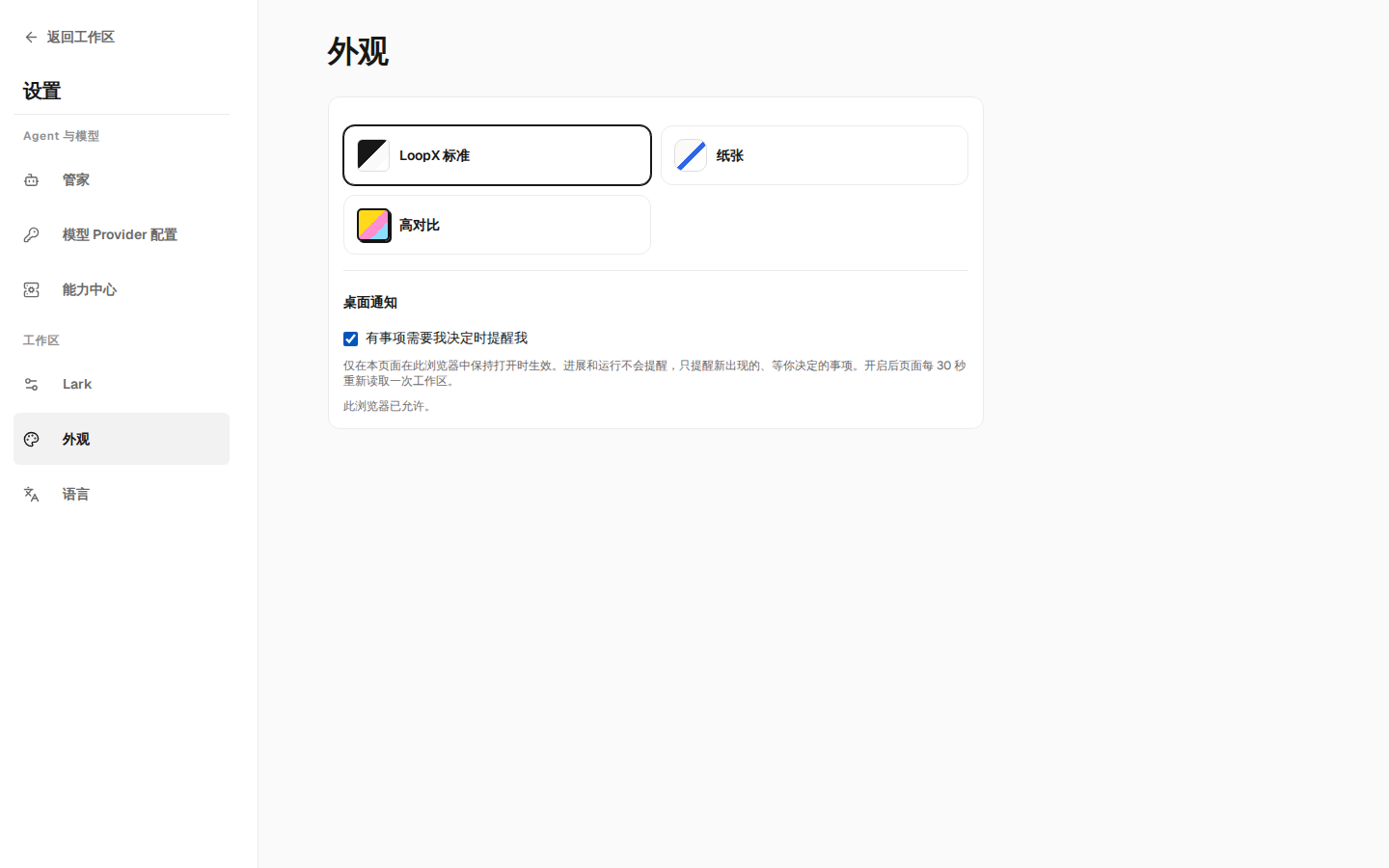
「设置 → 外观 → 桌面通知」是每个浏览器各自的开关,默认关闭。开启时浏览器会询问一次通知权限, 只有允许后开关才会保持开启;页面会回读浏览器的答复(已允许、已拒绝、不支持)。开启后,页面 每 30 秒在后台重新读取一次工作区(标签页隐藏时每 60 秒),当出现一条新的、等你决定的事项且你 没有正看着这个页面时,发出一条桌面通知;点击通知会回到该 Goal 并打开这条事项。进展、运行和数量 变化不会通知;开启当下已经在等你的事项也不会重复提醒;可选提醒(不阻塞 Agent 的用户操作)会列在 工作区里,但不会打扰你。关闭开关后立即停止后台读取。如果浏览器曾拒绝通知,之后在站点设置里允许, 回到本页面或打开设置时会重新读到允许,开关即可再次开启;反过来在站点设置里撤销,页面也会如实显示 并停止后台读取。这只在本页面保持打开时生效,不是服务端推送,也不替代飞书等渠道通知。
"Settings → Appearance → Desktop notifications" is a per-browser switch, off by default. Turning it on asks the browser for permission once and keeps the switch on only when granted; the page reads the browser's answer back (allowed, blocked, unsupported). While on, the page re-reads the workspace every 30 seconds in the background (60 seconds when the tab is hidden) and sends one desktop notification for each new item that waits on you while you are not looking at this page. Clicking the notification returns to that Goal and opens the item. Progress, runs and counts never notify, and items already waiting when you turn it on are not replayed. Turning it off stops the background reads. This works only while this page stays open; it is not a server push and does not replace channel notifications such as Lark. An optional reminder (a user action that does not block the Agent) is listed in the workspace but never interrupts you. If this browser once blocked notifications and you allow them in its site settings later, returning to this page or opening Settings reads the answer back and the switch can be turned on again; a permission revoked in the site settings shows as blocked and stops the background re-read.
🛡️ 8. 安全与不可逆操作保护
需要你确认的操作使用各自的预览与确认流程。以创建 Goal 为例:
- 先检查范围: 预览列出目标、目录、执行权限及预期影响;内容不对就返回修改。
- 再确认具体操作: 创建 Goal 的确认会开始首轮推进。合并、发布、删除、支付等 受保护操作仍按各自授权流程处理;批准一项操作不会顺带批准另一项。
- 核对实际结果: 查看操作回执和刷新后的状态。预览、请求被接收、执行完成、 产物通过验收是不同阶段;失败或结果未知时保留这个区别,不能只凭提示文字认定成功。
Agent 在既有授权内推进普通任务,不等于每一步都要你重新点击确认。阅读页面、筛选任务、 下载快照也不会增加执行权限。只读来源保留其限制,截图、导出和对外分享仍需检查是否含私有内容。
键盘快速导航 / Keyboard quick navigation
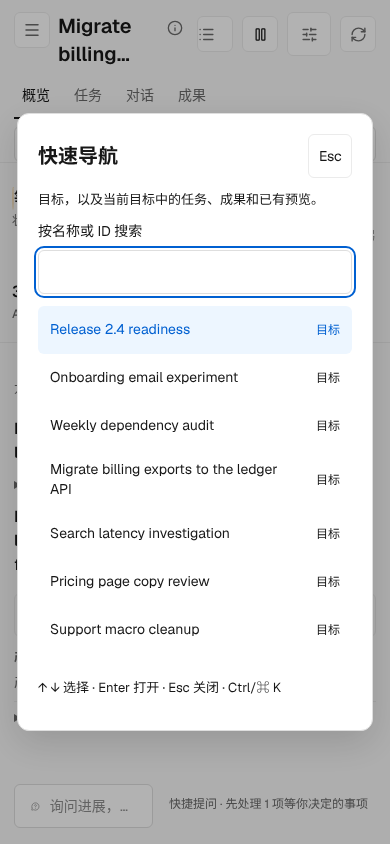
按 ⌘K / Ctrl-K,或点击侧栏底部的「快速导航」,按名称或 ID 搜索目标, 以及当前目标的已加载任务、成果与已有操作预览。使用 ↑ / ↓ 选择,Enter 打开, Esc 关闭并返回原焦点。中文输入法的确认键不会触发导航。
Press ⌘K / Ctrl-K, or choose Quick navigation at the bottom of the sidebar. Search Goals and the current Goal's loaded tasks, results and existing reviewable previews by name or ID. Use ↑ / ↓ to select, Enter to open, and Esc to close and restore focus. IME confirmation does not navigate.
导航使用当前来源的投影,不创建预览、不发送 Agent 指令,也不执行操作。 已有预览仍需在原详情中确认。只读来源只提供浏览;加载中或不可用的目标会明确标注。 搜索不是完整历史索引;未加载的历史任务和其他结果仍通过现有任务、文件入口查看。
Navigation uses the current source projection. It creates no preview, sends no Agent instruction and executes no action. Existing previews still require their normal confirmation. Read-only sources offer browsing only; loading or unavailable Goals are labelled. This is not a full history index: use the existing Tasks and Files views for history and additional results that are not currently loaded.
浏览目标概览、任务或文件时不再提前准备聊天会话;打开 Chat 或主动发送消息后, 仍由原有会话 owner 准备会话。
Browsing Goal Overview, Tasks or Files no longer prepares a chat session in the background. Opening Chat or explicitly sending a message still prepares it through the existing session owner.
保存团队报告原文 / Save a team report source
在成果、对话或证据视图打开团队报告后,点击 下载原文 / Download source, 保存当前显示版本的 UTF-8 原文。文件名包含版本摘要;Markdown、JSON 和文本保留 相应扩展名,其他类型按文本保存。下载不会重新运行 Agent、核验或采用报告,也不会 修改 Goal。它是所读版本的本地副本,不代表后续版本仍获验收;报告读取失败或失效时, 先通过原有刷新/重试恢复可读内容。
Open a team report in Results, conversation or evidence, then choose Download source to save the displayed version's exact UTF-8 source. The filename includes a version prefix. Markdown, JSON and text retain their extensions; other types download as text. Saving reuses the existing readback without running an Agent, invoking validation, recording adoption or changing the Goal. The file is a local copy of that version, not a promise of continuing acceptance. If the reader becomes unavailable, use its existing refresh/retry before downloading again.
🎬 30 秒产品发布演示视频
视频展示总览、任务看板、对话托盘、飞书连接和主题切换。 也可以直接打开演示视频。 具体按钮与状态以当前安装版本和上文操作说明为准。